Revenue: payment sync
Webhooks tell Hereling about payments from the day you connect. A read-only key lets it also read who is subscribed right now, so users who paid before that day show up correctly from the start.
What it does
Paste a read-only RevenueCat API key and your RevenueCat project id under Settings → Payment sync. Hereling asks RevenueCat about every user it already knows (anyone who made an AI request or whose payment reached the webhook) and stores their subscriptions and one-time purchases as state: product, status, next renewal, lifetime revenue. It asks again every night about users seen in the last 35 days and current subscribers, and within five minutes about anyone new.
- App Store and Google Play: RevenueCat keeps every payment of a subscription with its day and amount. Hereling records each one on the day it was paid, starting with the payment that covers the day your Hereling project was created, and it does so on the first read too. A subscriber who paid on 3 September shows that payment right away. One-time purchases made after the project was created are recorded the same way.
- Other stores (Stripe, Paddle, RevenueCat Web Billing, Amazon): RevenueCat reports only lifetime revenue. Each night an increase is recorded as a renewal (or purchase) and a decrease as a refund, dated when detected. The first read stores state only.
- A payment that also reaches your webhook is recorded once: both carry the store's transaction number.
- Refunds RevenueCat reports are recorded on the day Hereling notices them. Rows from the sync are marked
source: sync. - Active subscribers with no payment in the selected range are awaiting payment, not losing money.
Create a read-only key
Open API keys
In RevenueCat, open your project and choose API keys in the left sidebar.
New secret API key
Under Secret API keys, click + New secret API key.

Read only, and nothing else
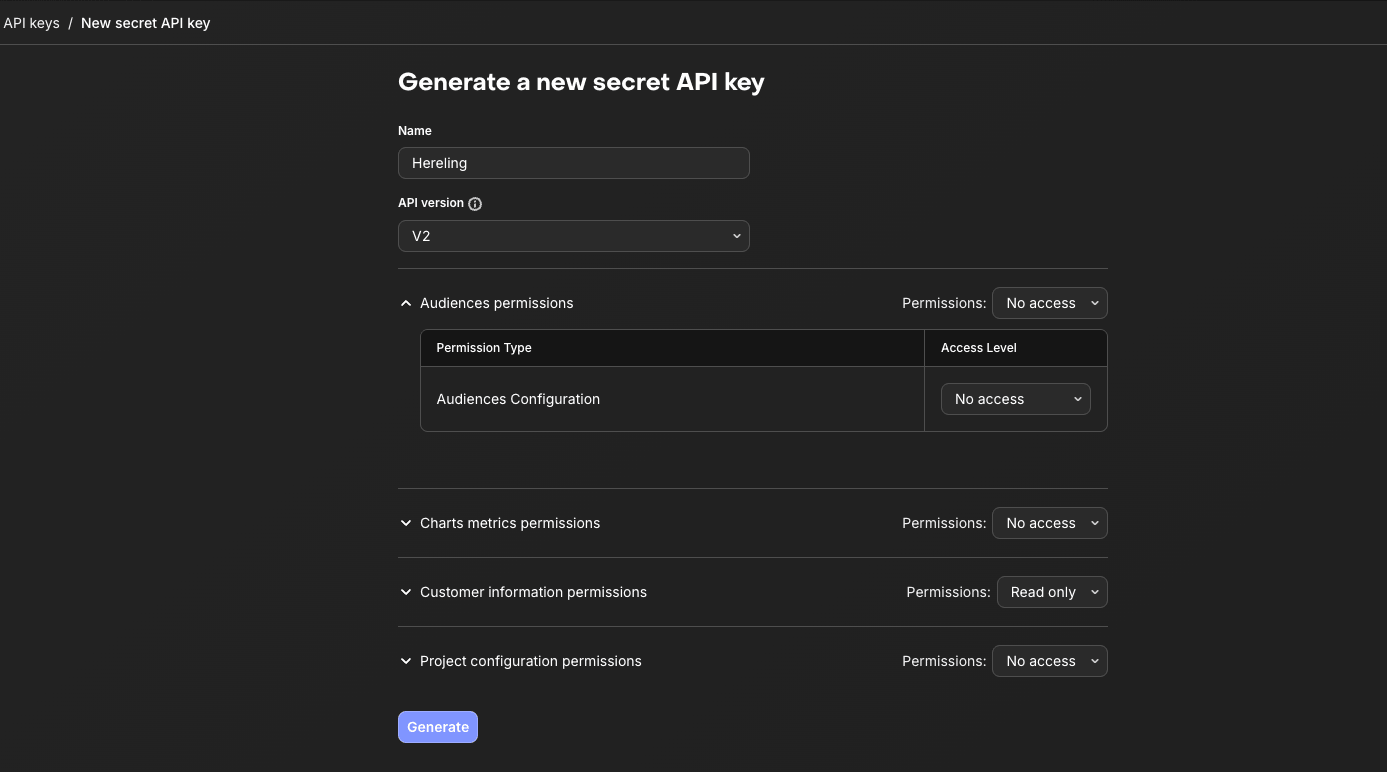
Name it Hereling, choose API version V2, set Customer information permissions to Read only, and leave every other group on No access. Then click Generate.
Copy the key
Click Copy key. RevenueCat shows it once; Hereling does too.
Find your Project ID
It is the short code after /projects/ in your browser's address bar on any RevenueCat page of the project.
Connect in Hereling
Open your project's Settings → Payment sync, paste the key and the Project ID, tick the read-only confirmation and click Connect and sync. You will see Checking users… with a live count, then Completed with the number of users checked and subscribers found.
User ids
Hereling finds a user in RevenueCat by the id your app sends in the x-hereling-user header. It must be the same id your app gives RevenueCat as the App User ID for that person.
Letter case does not matter for ids shaped like a UUID. Swift's UUID().uuidString is uppercase while Supabase and most servers write the same id in lowercase; Hereling stores such ids in lowercase and asks RevenueCat about both forms, so an iPhone and an Android user with the same account are both found.
When RevenueCat has no customer with that id, Settings → Payment sync says how many users were not found in RevenueCat and the Users tab marks them Not in RevenueCat. Their AI cost still counts; only their subscription stays unknown. There are two usual reasons: the user has not reached RevenueCat yet (some apps identify users to RevenueCat only when the paywall opens), or the app sends Hereling a different id. In the second case, once your app sends the App User ID, those users arrive under that id and are checked within five minutes.
What Hereling stores
| Kept | How |
|---|---|
| The API key | Encrypted (AES-256-GCM) with a key that lives only in Hereling's deployment settings, never in the database. Shown as its last four characters. Removed with one click. |
| Per customer | Subscription and purchase state: product id, status, store, country, period end, lifetime revenue. No names, no emails. |
| Per payment | Day, amount in USD and in the currency paid, the store's transaction number and the plan: the same row a webhook writes. |
| Per user | Whether RevenueCat has a customer with that id, and when Hereling last asked. |
| Per check | When it ran, how many users it checked, how many subscribers and revenue events it found, and the last error as a short code. |
Hereling only reads. It never writes to RevenueCat and never grants, refunds or cancels anything.
Plans and product ids
Synced subscribers land on a plan without any setup: Hereling names the plan after the RevenueCat entitlement the product grants (for example premium), the same name webhooks record. A plan with that name under Plans gets its AI budget applied.
Each plan also has an optional Product IDs field. RevenueCat product ids look like prod1a2b3c4d5e; listing one there puts its subscribers on that plan instead of the entitlement's. Settings → Payment sync only asks about a product when its current subscribers ended up with no plan, which happens when the product grants no entitlement.
Limits
- Dated payments exist only for App Store and Google Play. For other stores, revenue from the sync is dated when it was detected, at most a day late; webhooks remain the exact source there.
- Payments for periods that ended before your Hereling project was created are not recorded: Hereling saw no AI cost to set them against.
- RevenueCat does not say which payment was refunded or when. Hereling takes a refund off the most recent payments and dates it when noticed.
- RevenueCat's customer list holds everyone who ever opened your app, and its API cannot list only subscribers. Hereling never reads that list: it asks only about users it already knows, a few requests each (one more per App Store or Google Play subscription), within RevenueCat's limit of 480 requests a minute. A subscriber who never uses an AI feature and whose payments have not reached the webhook is not in the per-user tables.
- Sandbox and test-store data is never stored.
- Available on Pro. Up to three manual syncs a day; the nightly sync always runs.
- RevenueCat only for now. Stripe and Paddle sync are planned; their webhooks and the CSV upload work today.